
What to look for in a choreography app
Most choreographers and dance teachers need a few core things: a way to map formations, a way to schedule rehearsals, a way to review video with the group, and some way to share work with dancers. The challenge is that most tools only solve one of these — so you end up with four separate apps that don't talk to each other.
Before comparing products, it's worth being specific about which of those four is actually costing you time. People tend to buy software for the problem that's most visible rather than the one that's most expensive, and those are usually different. Formation planning is visible — you can see the diagram. Coordination is invisible, and for most teams and most studios it consumes far more hours.
A quick diagnostic. Over your last project or last recital season, roughly how much time went to each of these?
Designing formations. Sketching, revising, working out transitions.
Coordinating people. Collecting availability, scheduling, rescheduling, chasing responses, tracking who came.
Communicating the plan. Explaining positions, re-explaining them, re-sending diagrams, answering "where am I in this one?"
Reviewing footage. Watching rehearsal video, giving feedback, getting that feedback to the right dancer attached to the right moment.
Whichever of those was largest is the tool category you should be shopping in. The best tools for most groups cover the full workflow in one place, so you're not copying notes between apps — but a tool that solves your actual bottleneck beats a broader one that doesn't.
Choreographers and dance teachers need different things
These two roles get lumped together in software marketing, and they shouldn't be. The work is genuinely different, and it changes which features matter.
A choreographer usually works one piece deep. One cast, one track, one performance date. The hard problems are design problems: does this formation read from the house, does this transition collide, does the shape change land on the right musical moment. Depth on a single project matters more than anything else.
A dance teacher usually works many pieces wide. A recital season might mean six to twelve numbers across different classes and levels, each with a different cast, most of whom are children or teenagers, running on a fixed term calendar you don't control. The hard problems are breadth problems: which piece is behind, which class hasn't been taught the ending yet, which dancers are in three numbers and therefore have quick changes, and what happens when a student joins in week five.
That difference has practical consequences when you're evaluating tools:
Multi-project handling matters far more for teachers. A tool that's excellent for one piece and awkward at ten is fine for a choreographer and unusable for a teacher in recital season. Check what happens at project six, not project one.
Reusability matters more for teachers. Teachers repeat structures constantly — the same entrance formation shapes, the same staging conventions, often the same pieces year over year with a new cast. Saved presets and duplicable projects save real hours; for a one-off choreographer they're a nice-to-have.
Access model matters more for teachers. A choreographer's cast is usually adults who can be handed a link. A teacher's students may be minors, may not have their own devices, and may need a parent in the loop. Any tool that requires every dancer to hold an account needs checking against that reality before you commit a whole studio to it.
Feedback style differs. Choreographers give notes to peers. Teachers give notes to students, often young ones, and the tone and delivery are part of the pedagogy. Timestamped video comments work well here precisely because they're specific and unemotional — "at 0:42 your arm is late" lands differently from a general "you need to clean that."
The three categories of choreography software
Nearly everything marketed to choreographers falls into one of three groups, and they're not really competing with each other.
Formation editors. Canvas tools for placing dancers on a stage and sequencing formations. This is the most crowded category — Coryo, Formi, StageKeep, Choreographic, Stagewrite and others all live here in some form. They differ mainly on transition preview quality, how many formations you can sequence, and whether the plan can be shared with a team or only exported as images. If formation design is your bottleneck, compare within this category carefully — the differences are real. See a detailed comparison of the formation editors →
Team coordination tools. Availability collection, scheduling, attendance, notes. Most groups solve this with general-purpose tools — group chats, shared calendars, spreadsheets, availability polls — rather than anything dance-specific, which is why it stays expensive. Nothing in the stack knows what a rehearsal is.
Video feedback tools. Timestamped comments on footage, drawing over frames, side-by-side comparison. Some are built for dance, most are built for sports coaching and adapted.
The practical consequence is that anyone using best-in-class tools from all three categories is running three unconnected systems, and the seams between them are where information goes missing: the formation plan doesn't know which rehearsal is next, the attendance sheet doesn't know which formations that dancer missed, the video note doesn't know which formation it's about.
Studio management software is a fourth category — and a different one
If you searched for "dance teacher software" or "dance studio software," there's a good chance you're actually looking for this category rather than any of the three above, so it's worth naming clearly.
Studio management platforms — Jackrabbit Class, DanceStudio-Pro, The Studio Director, Akada and others — run the business side of a dance school: class registration and enrolment, tuition billing and payment processing, family and parent accounts, staff scheduling and payroll, costume and recital fee tracking, and class-level attendance for administrative purposes.
Coryo does none of this, and it isn't a roadmap gap or a "coming soon" — it's a different product category with different buyers, different compliance requirements, and different data. Coryo has no registration, no invoicing, no tuition handling, no payroll, and no parent portal. If your bottleneck is chasing unpaid tuition or managing enrolment across fourteen classes, a choreography platform will not help you, and you should be shopping in the studio management category instead.
The distinction that actually matters is this: studio management software runs the school; choreography software makes the pieces. A studio management platform knows that Mia is enrolled in Intermediate Jazz and that her account is paid through March. It does not know where Mia stands in formation four, whether she was at the rehearsal where the ending changed, or that her timing is late coming out of the bridge.
Most studios that use both keep them separate on purpose, and that's the correct arrangement — the admin system is the source of truth for who is enrolled and who has paid, and the choreography system is the source of truth for what the pieces are and how they're going. The overlap is small enough that trying to make one do the other's job usually produces a worse version of both.
Coryo
Coryo is built for dance teams, choreographers, and teaching staff who need to manage the creative workflow in 2026: formations, rehearsals, video, and (for studios) live floor projection.
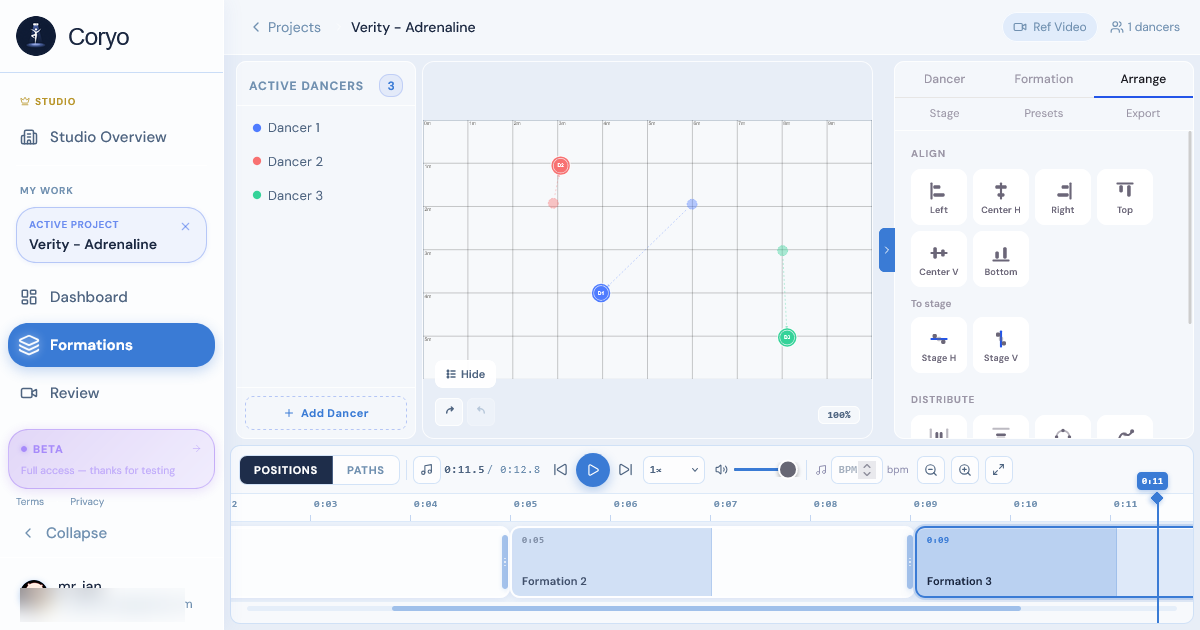
The formation editor is canvas-based — you drag dancers onto a stage, build a sequence of formations, animate transitions, and preview the full piece against your track. The rehearsal scheduler collects availability from every member, shows you where it overlaps, and tracks attendance per session. The video review tool lets your group timestamp and comment on rehearsal footage, so feedback is attached to the moment it refers to rather than delivered as a paragraph afterwards.
The Team plan adds a live multi-projector floor projection system that maps formation positions onto the physical stage floor — dancers see their marks on the ground rather than translating a diagram into a location. For a teacher staging a recital number with a class of ten-year-olds, this removes the single most repetitive instruction in the room. It's also the one part of the platform with no real equivalent elsewhere.
What connects it is that all four live in the same project. A rehearsal knows which formations it covers; attendance is attached to that session; a video note is attached to that piece. You're not maintaining the same information in three places.
For dance teachers specifically: each recital number is its own project, so pieces stay separated by class rather than piling into one file, and the marketplace and preset system let you reuse staging you've already built instead of rebuilding it every season.
**Where it's the wrong choice:** if you're a solo choreographer who only needs to sketch positions and never shares a plan with anyone, the collaboration layer is overhead you won't use — a single-purpose formation editor will be faster. And if what you need is enrolment and billing, see the section above; that's not what this is.
Free plan includes 1 project, up to 7 members, and 3 formations per project. Pro is $8/month billed annually ($10 monthly). Compare all plans →
Stagewrite
Stagewrite is a browser-based formation planner focused specifically on the grid editor. It's simpler than Coryo — no rehearsal scheduling, no video review — but the formation editor is solid for users who only need that piece.
Best for: individual choreographers or directors who only need to map positions and don't need team collaboration features.
Google Slides / PowerPoint
A surprising number of choreographers and teachers use presentation tools to map formations — shapes for dancers, slides for each formation. It works, and everyone already has access. The downside is there's no animation preview, no dancer-specific tracking, and sharing requires manual exports.
It's worth being clear about what you give up, because the missing piece is the expensive one: without transition preview you cannot see collisions before rehearsal. Slides show you a sequence of still pictures, and the errors in formation design live in the movement between them. Groups using this approach typically discover crossing paths on the studio floor, which costs studio time and a room full of confused dancers.
The version of this that works better than most people expect is slides plus a numbered position convention — every dancer keeps the same number across every slide, and the number is written on the shape. It doesn't give you animation, but it does solve the "which dot am I?" problem that makes most slide-based plans unreadable by the third formation.
Best for: very small groups or one-off projects where setting up dedicated software isn't worth it.
Notion or physical grids
For rehearsal scheduling and notes, many teams and studios use Notion, Google Docs, or even physical whiteboards. The advantage is flexibility — you can structure it however you want. The disadvantage is it takes time to set up and maintain, and it doesn't connect to your formation or video work.
The failure mode is specific and predictable: these systems degrade rather than break. A Notion rehearsal database is accurate in week one, mostly accurate in week three, and by week six nobody trusts it enough to check it — so people ask in the group chat instead, and the chat becomes the real source of truth while the database sits there looking authoritative. Any system that depends on someone manually keeping it current will drift the moment that person gets busy, which is exactly when it's most needed. In a studio, that person is usually a teacher who is also teaching.
Best for: groups that already have a Notion workspace, have someone who genuinely enjoys maintaining it, and don't want to introduce another tool.
When you don't need any of this
Software has a setup cost, and for some situations it never pays back.
If you're working with three or four dancers on a single piece, you can hold the whole thing in your head and fix spacing by looking at the room. Paper is faster than any canvas tool at that scale, and a group chat is a perfectly good scheduling system for four people. A teacher with one class and one short recital number is in the same position.
The thresholds where tooling starts earning its cost are roughly these. Around six to eight dancers, spacing stops being something you can eyeball reliably and formations start needing to be designed rather than arranged. Around ten or more sessions, scheduling stops being a few messages and becomes recurring coordination work. Around three or more people who need the same reference, verbal explanation stops scaling and you need a shared artifact that stays current. Around three or more concurrent pieces, which is the threshold most teachers cross first, you stop being able to remember the state of each one and start needing somewhere to look it up.
Hitting one of those justifies a tool for that one thing. Hitting several is when a connected platform starts to make more sense than three separate ones — not because any individual tool is inadequate, but because the cost has moved into the gaps between them. See how Coryo's formation editor works →