
Collect availability before you schedule anything
The most common scheduling mistake is picking dates first and asking people to work around them. You end up with recurring absences from the same dancers, resentment from people who had prior commitments, and constant reschedules.
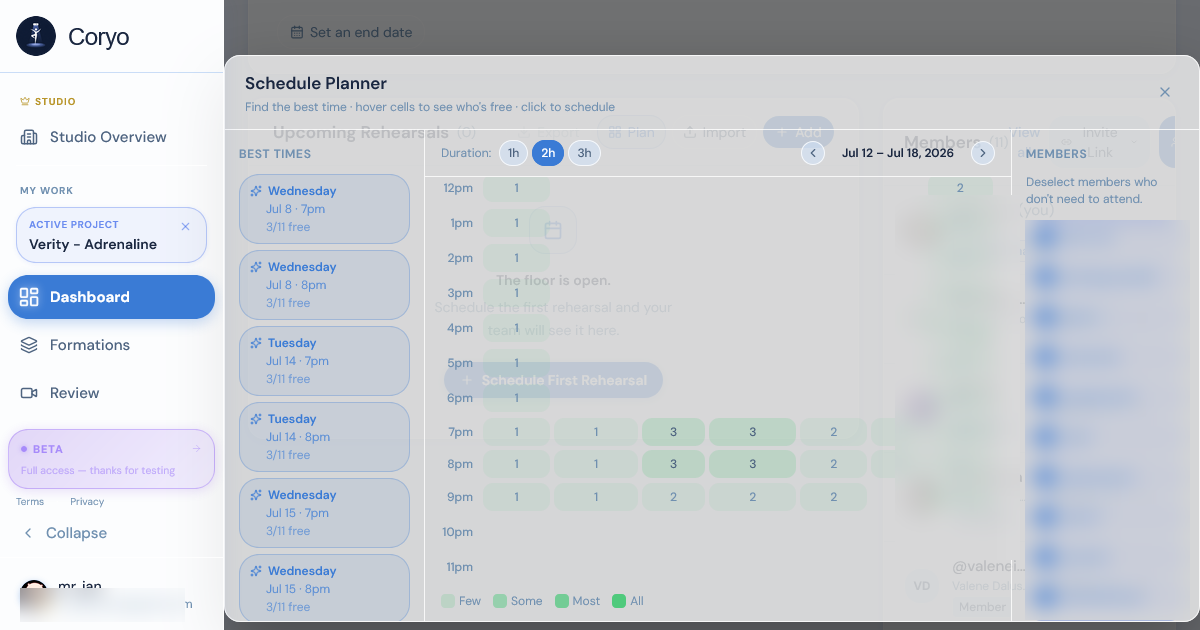
Instead, collect availability first. Use a simple grid — list potential dates and times, ask everyone to mark when they're free. Find the windows with the most overlap. Only then schedule.
There's a second, less obvious benefit. Availability collected in advance is a commitment record. A dancer who marked Tuesday 7pm as free has a materially harder time backing out of a Tuesday 7pm rehearsal than one who was simply told about it. You haven't added any enforcement — you've just moved the decision to a moment when saying "actually I'm busy" was free.
Two practical notes on collection. Ask for a window wider than you need: if you want two rehearsals a week, collect availability across the whole week, not the three evenings you have in mind. And set a deadline for responses — an availability grid with four of eleven responses is worse than useless, because it looks like data.
Coryo's availability grid collects this automatically — members fill it in and you see the overlap immediately. Start scheduling for free →
Work backwards from your performance date
Count the weeks between now and your performance. Decide how many rehearsals you need (more on this below). Divide those rehearsals across your available weeks.
Leave a buffer — don't schedule all your rehearsals back-to-back with no slack. If a rehearsal gets cancelled, you need room to make it up. A good rule: plan for one cancelled rehearsal per month.
Working backwards also gives you natural checkpoints, and setting them explicitly is what separates teams that peak on time from teams that are still learning choreography in the final week. A workable set of milestones for a multi-week cycle:
All choreography taught by the 60% mark. If you're still teaching new eight-counts in the last 40% of your schedule, you have no cleaning time, and cleaning is where a piece actually becomes performance quality.
All formations and transitions placed by the 75% mark. Formations are the thing dancers forget first under performance nerves. They need repetitions, not just an introduction.
First full run-through by the 80% mark. The first full-out run always exposes something — a transition that's too fast, a section where stamina collapses. You need enough sessions left to fix it.
Final two rehearsals: no new information. Run, clean small details, run again. Introducing a change in the last week means performing something the team has done fewer than five times.
How many rehearsals do you actually need?
A rough guide:
- 2–3 minute piece, experienced team: 8–10 rehearsals - 2–3 minute piece, newer team: 12–16 rehearsals - 4–6 minute piece, experienced team: 14–20 rehearsals - Competition piece with multiple formations: add 20–30% more sessions
These are starting points, not rules. The actual number depends on how quickly your team picks up choreography, how complex the formations are, and how much individual practice your dancers do outside of group rehearsals.
The variable people most often underestimate is formation count. Choreography can be learned individually — a dancer can drill an eight-count at home from a video. Formations cannot: they require the specific people in the specific room. A piece with eight formation changes needs meaningfully more group time than a piece with three, even if the movement vocabulary is identical. If you're adapting these numbers, adjust on formation complexity before you adjust on choreography difficulty.
The second underestimated variable is team size. Coordination cost is not linear. A 12-person team doesn't need twice the rehearsals of a 6-person team, but it does need more than the same number — more spacing to clean, more transitions to untangle, and a higher chance that any given session is missing someone.
Assign a goal to each rehearsal
Vague rehearsals ("we'll just run through stuff") are the main cause of teams reaching performance week still not clean.
Before each rehearsal, decide what you need to accomplish: which sections you're learning, which formations you're cleaning, whether you're running full-out or drilling details. Share this with your team in advance so they know what to expect.
A useful discipline is to write each goal so it has an observable finish condition. "Work on the chorus" has no end state, so the session ends when time runs out. "Chorus clean at full speed, three consecutive runs without a spacing correction" tells you whether the rehearsal succeeded, and it tells the team what they're aiming at. You will sometimes miss the target — that itself is information, because it means the next session's plan was based on an assumption that turned out to be wrong.
Sharing the goal in advance also changes what dancers do between sessions. "Saturday we're cleaning formations 3 through 5" is an instruction to review formations 3 through 5, without you having to give one.
In Coryo's scheduler you can attach notes to each rehearsal session, so the goal is documented and visible to the whole team before they arrive — and still there afterwards when you're trying to remember what you actually covered.
Protect the sessions that need everyone
Full attendance is rare, and waiting for it wastes the calendar. The workable approach is to sort your rehearsals by how much they actually depend on the full team, and schedule accordingly.
Needs everyone: full run-throughs, spacing cleans, transition work, anything involving formations. These belong in your highest-overlap slots — the ones your availability grid says the most people can make.
**Doesn't need everyone:** teaching new choreography to a subgroup, sectional cleaning, front-line detail work, individual corrections. These can run in the medium-overlap slots that would otherwise go unused.
This is why the availability overlap view matters beyond just picking a time: it tells you which slots are scarce. A Wednesday 7pm that works for eleven of twelve people is a resource, and spending it teaching an eight-count to four dancers is a waste of it.
One caution: sectionals accumulate drift. Two groups rehearsing the same transition separately will each develop a slightly different version of it, and the mismatch only surfaces when you put them together. Schedule a full-team run after any stretch of two or more consecutive sectionals.
Track attendance — and act on patterns
Attendance data is only useful if you use it. Check it weekly. If a dancer has missed the last 3 rehearsals, have a conversation before it becomes a problem. If attendance is dropping across the board, look for scheduling issues — maybe the time slot stopped working for people.
The distinction that matters when you review the data is individual pattern versus team pattern, because they have completely different causes and completely different fixes.
One dancer repeatedly absent is an individual conversation: a schedule conflict that changed, a commitment problem, or something outside dance entirely. It's usually solvable, and it's almost always better solved early — a dancer who has missed six sessions is often past the point where catching up feels possible, and that's when people quit rather than explain.
Broad attendance decline is a scheduling problem, and treating it as a discipline problem will make it worse. Common causes: the slot collided with something seasonal (exams, a term change, a holiday), rehearsals are running long past their stated end time, or sessions stopped feeling productive. The last one is the most common and the least often diagnosed — people reliably show up to rehearsals where they make visible progress.
Coryo tracks attendance per rehearsal and gives you a view across the full project, so both kinds of pattern are visible without maintaining a spreadsheet. See how Coryo's rehearsal scheduler works →